


 Start
Start
Free online retrospectives for teams of any size
ProstoRetro is a service for running team retrospectives online with templates, anonymous cards, voting, timers, and an AI assistant.
It's free
Millions of teams around the world use retrospectives because they work.


About retrospectives
What a retrospective is and why your team needs one
A retrospective is a meeting where the team reviews a finished sprint or stage of work: what went well, what got in the way, and what to change next. Running them regularly turns scattered observations into a concrete action plan and stops the same problems from repeating sprint after sprint.
What went well
The team notices the decisions that worked and keeps them, instead of only picking over mistakes.
What got in the way
Small irritations surface before they turn into habits, and the whole team hears them.
What to change
The conversation ends with a concrete action plan rather than general words.
More about why retrospectives matter
Templates
Retrospective templates
The template sets the shape of the conversation. Change it from time to time: the same format gets stale fast and the team starts answering on autopilot.

Start / Stop / Continue
Three columns: what to start doing, what to stop, and what to keep. The all-purpose template for teams set on improving their process.
Read
What went well
The conversation opens with wins rather than problems. A good fit after a rough sprint, when the team needs to find its footing again.
Read
Mad / Sad / Glad
Cards are sorted by feeling: what makes people angry, sad or glad. Helps surface the things nobody usually says out loud.
Read
4L: Liked, Learned, Lacked, Longed for
What people liked, learned, lacked and longed for. A thorough review for longer stages and the end of a project.
Read
Sailboat
The team works out what pushes it forward and what drags it back. A visual format for people who find ordinary boards dull.
Read
Your own template
If none of the ready-made formats fit, build your own: your columns, your questions, your order of phases.
Features
From the warm‑up to the action plan
Everything a retro needs is already in one room, so there is no stitching together a board, a timer and voting from different tools.
 Anonymous
Anonymous cards for honest feedback
Anonymity removes the fear of being misread. Cards can be written anonymously, so no author is shown next to them and the idea carries the weight rather than the job title of whoever raised it. That matters most to quieter people and to new joiners who find it hard to argue with senior colleagues out loud.
Voting and prioritisation
Once the ideas are in, the team votes. Everyone gets a fixed number of votes, so choices have to be made, and what genuinely matters rises to the top instead of whatever was said loudest. Voting can be anonymous too.
 AI suggests
AI assistant: summary and action plan
The AI assistant reads the cards, merges similar ones into themes and suggests wording for the action plan. It does not decide for the team; it saves the twenty minutes usually spent sorting fifty sticky notes into piles by hand.
Timer and facilitation
Retros sprawl easily: the first question eats half the meeting and the team never reaches the action plan. The built-in timer keeps each phase moving, the facilitator can see who is already done, and phases switch on everyone's screen at once.
 Mia's turn
Warm-ups for the team
A warm-up at the start clears the awkwardness and draws in people who would otherwise stay quiet for the whole hour. A question appears on screen along with a randomly chosen participant. The questions are picked so that nobody ends up on the spot.
 Mood surveys
 Polls
Polls Reactions and memes
 Timer music
 Results by email
And plenty more
Mood surveys with a history for the team, a review of the last retro's action items, quick polls, reactions and memes in the discussion, music for the timer, and the meeting results emailed to every participant.
How it works
How to run an online retrospective in 5 steps
- 1
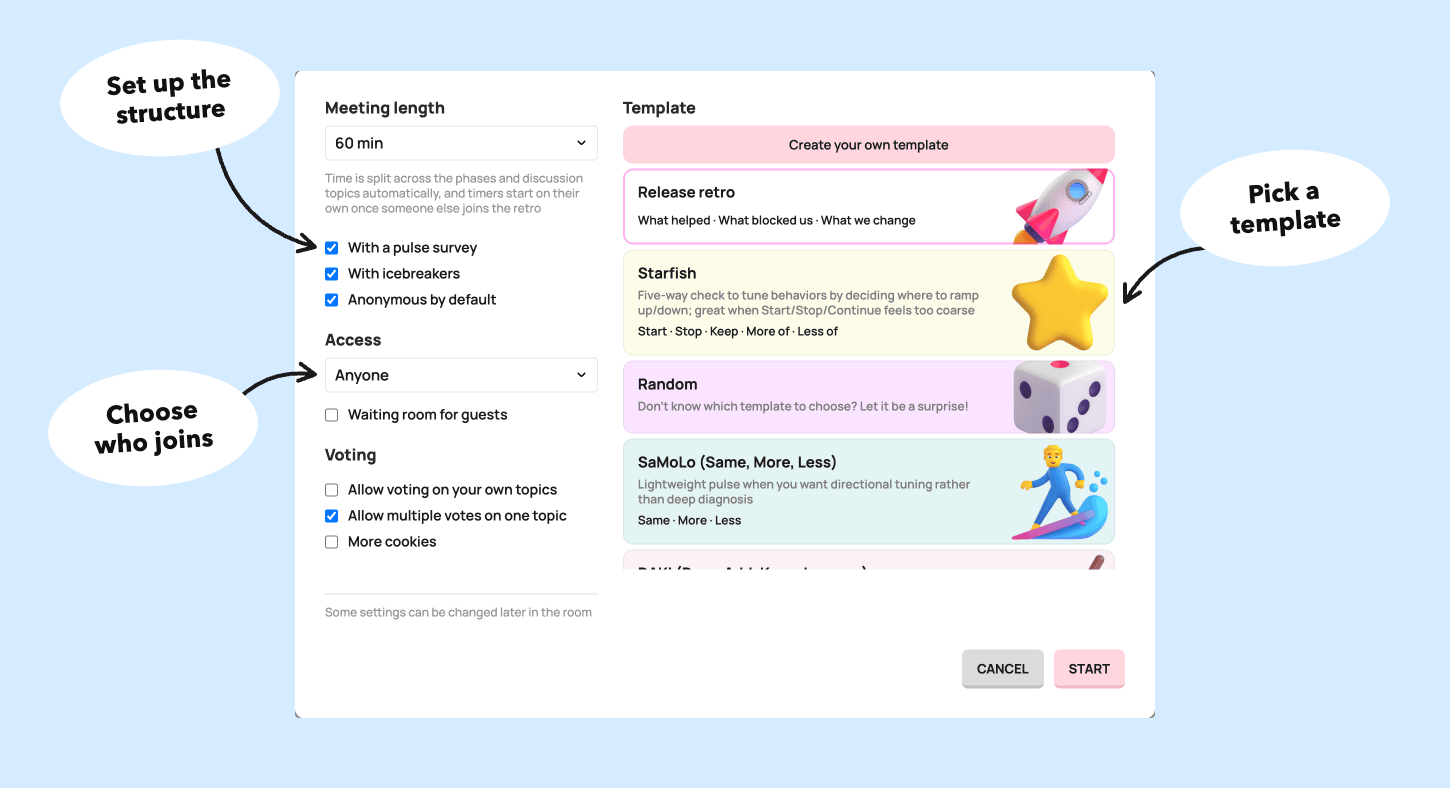
Create a room and pick a template
- 2
Send your team the link — participants do not need an account
- 3
Open with a warm-up to get everyone talking
- 4
Collect the cards and group the similar ones
- 5
Vote and write down the action plan

Who it's for
Who is it for?
Retrospectives help any team that regularly finishes something and wants to do it better.
Engineering
Review the sprint, find the bottlenecks and agree on what to change.
Marketing
Look at which campaigns worked and adjust the strategy.
Sales
Go through targets and break down the deals that went well and badly.
HR and recruiting
Review hiring and onboarding, and find where the process stalls.
Events
Debrief the event just finished and gather feedback for the next one.
Education
Teachers and students look at how the course is actually going.
Volunteering
Review completed initiatives: what worked and what did not.
Sounds like your team?
Get StartedWhat is an online retrospective?
It is the same team retrospective you would run at a whiteboard in the office, except everyone gathers in a shared online room. Each person writes cards from their own device, the team groups them, votes and records an action plan.
Do participants need an account?
No. The facilitator creates a room and shares the link; participants follow it and land straight on the board.
How many people can I invite?
There is no limit on the number of participants.
Can cards be written anonymously?
Yes. Cards and voting can both be made anonymous, so there is no indication of who left them.
Which retrospective templates are available?
Start / Stop / Continue, What went well, Mad / Sad / Glad, 4L, Sailboat and others. You can also build your own template with the columns you need.
How much does ProstoRetro cost?
ProstoRetro is free to use.
What happens to the results after the meeting?
The results stay in the room, and participants receive an email with the outcome of the retrospective.
How is ProstoRetro different from Miro?
In Miro you assemble the retrospective yourself: the board, the timer, the voting and the order of phases. ProstoRetro walks the meeting through those steps, counts the votes and emails the results — it is built for one scenario.
Guides
Read before your next retro
Retrospective templates for agile teams
Retrospective templates with their columns explained: Sailboat, Start Stop Continue, Mad Sad Glad, 4Ls, Starfish and more. Run any of them free.
ReadA free EasyRetro (FunRetro) alternative
EasyRetro's free plan allows one public board a month. ProstoRetro is free for a retro every sprint, with anonymous cards, voting and AI grouping.
ReadA free Parabol alternative
Outgrown Parabol Starter's two teams, ten meetings a month or 30 days of history? ProstoRetro runs team retros free, with AI grouping and summaries.
ReadA free Retrium alternative
Retrium has no free plan as of October 2026. ProstoRetro runs structured team retros free, with anonymous cards, voting and AI summaries.
ReadA free TeamRetro alternative
TeamRetro has no free plan as of October 2026. ProstoRetro runs team retros free: templates, anonymous cards, voting, AI grouping and summaries.
ReadBlog
Articles about retrospectives
11 December 2024
How to Conduct a Great Retro?
A step-by-step walkthrough for the facilitator: board settings, icebreaker, pulse survey, reflection, grouping, voting and discussion, with minutes for each stage.
Read11 December 2024
Why Are Retrospectives Important?
In today's development world, project success depends not only on code quality but also on the team's efficiency, their ability
Read